This is very relevant to a project I’m working on. I have a XAML front end that will need to make calls into our application, and Web API seems like the way to go.
WinJS ViewBox workings and FlexBoxes
I came across this post today that talks about how the ViewBox works in WinJS. Meaning, what HTML/CSS are being used to create the ViewBox effect.
The same author has another article that talks about the difference between the ViewBox and the FlexBox. The FlexBox being a CSS thing and the ViewBox being a WinJS control.
Deleting old Windows Server Backup files
Amazingly, if you are using Windows Server Backup, you have no way to delete old backup files. The service is supposed to simply grow your backup data until your drive is full, and then it should start cleaning up the old backups, but that isn’t ideal.
I found that I was able to delete the oldest backup by using the command:
DiskShadow.exe
followed by
delete shadows oldest f:
Where f: is the drive that is used for backups. There is no way to tell it to keepLatest 100 like you can if you were just deleting the system state, but you can put a bunch of delete commands into a text file and point diskshadow at it.
Firefox 15 doesn’t scroll much in Windows 8
I’ve had a few of my friends test this behavior and I’m the only one who currently is experiencing it, so I’m not sure what is different about my setup than there’s, but for me, each click of my mouse wheel, whether at work using my wireless logitech, or at home using my USB generic mouse, causes FF to only scroll only a small amount, say 16px give or take.
This isn’t the case in other applications, like IE and Chrome.
If I go into the Windows 8 settings and change the scrolling to be greater, it has no noticeable impact in Firefox. However, I found that if I go to Firefox settings by navigating to the URL about:config, and modify the mousewheel.withnokey.numlines value (even if I just change if from 6 to 7) it “fixes” the issue.
WinJS Promises
I’m working on an app for Windows 8, and I decided that I would try doing it in HTML5 and Javascript (WinJS), thinking that I’d have an easier time with arranging HTML than with arranging XAML.
I’m pretty sure that isn’t going to be the case as it seems like it’s hard to make my app not look like a formatted webpage (no duh) instead of a native app. But anyway, the one thing that is cool to see is that MS is making sure that lots of stuff in WinJS uses promises.
A promise is a way to deal with callbacks, but usually in a nicer and more fluent manner. Rather than messing around with timeouts and callbacks, you can write code like something.execute().then(finish()).done(cleanup());
WinJS has it’s own Promise object. There is a very nice write up here:
http://stephenwalther.com/archive/2012/02/22/metro-promises.aspx
The best example is this one showing the full life cycle of a WinJS promise:
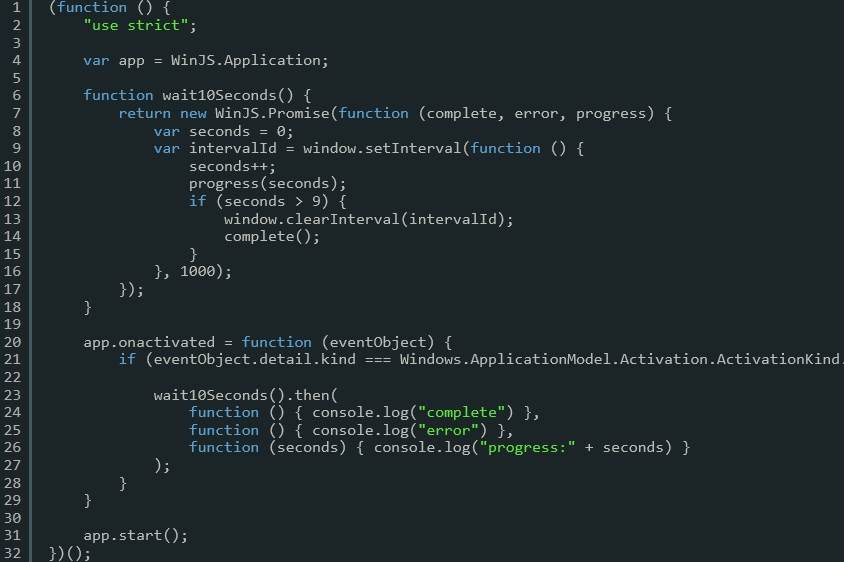
When working in regular javascript (instead of WinJS), you can make use of a number of different promise libraries:
Hacker Training
HackThisSite.org shows you how you can employ a number of hacking tricks to do bad stuff, but hopefully it will serve to show developers how to avoid these common avenues of attack.
Background tasks in asp.net
Recently a site I was working on, http://www.walshgroup.com needed to periodically pull down data from an external data source. I could have put this logic at the start of some request operation but then there would be some user waiting longer for his response than needed.
I ended up using this technique to refresh the dataset at regular intervals without messing with the users experience. For simple stuff, it beats writing a separate job to do this.
Accessing WHS Connector Software via secret HTTPS location
If you are ever in a situation when you want to install the Windows Home Server connector software, but don’t have the CD, you can always get it through the browser.
Just browse to:
It’s important that you do the https.
This page will give you the ability to download the right version of the connector software, as well as some tools for diagnosing issues with WHS.
Windows 7 x64 SP1 ERROR_NOT_FOUND 0x80070490 Solution
For the last couple weeks I’ve been unable to install SP1 for Windows 7 x64. From time to time windows update tries to install it, and it always fails with:
ERROR_NOT_FOUND 0x80070490
There are a ton of people online trying to figure out this problem, with a wide range of suggestions and solutions, and quite often people resorting to reinstalling windows.
One users post sent me down a path that allowed me to resolve the problem, but it wasn’t completely clear from his post that what I was doing was working, so I wanted to elaborate on what I did and how I fixed the issue.
First, I did the following without any change:
- Run chkdsk
- Run sfs /scannow
- Run the System Update Readiness Tool
The post by Ben-IS was the one that got me going in the right direction:
The log flies that I frequently checked (and cleared out) were:
C:WindowsLogsCBSCBS.log (filled with stuff when you run the service pack install)
C:WindowsLogsCBSCheckSUR.log (filled when you run the System Update Readiness Tool)
C:Windowsinfsetupapi.app.log (this one was most important)
When I checked setupapi.app.log I and searched for “failed to” it would find a line like this:
!!! sto: Failed to find driver update ‘C:WINDOWSWinSxSamd64_usbport.inf_31bf3856ad364e35_6.1.7600.16788_none_19ba59901d3be89eusbport.inf’ in Driver Store. Error = 0x00000490
<<< Section end 2011/12/17 20:38:02.355
<<< [Exit status: FAILURE(0x00000490)]
So, given that line, I was then able to register the driver using the command:
pnputil -a C:WINDOWSWinSxSamd64_usbport.inf_31bf3856ad364e35_6.1.7600.16788_none_19ba59901d3be89eusbport.inf
So after doing that, I go back and run the SP install again, and guess what, it fails in exactly the same place with the same error. Crap.
I had copied the setupapi.app.log out of it’s folder so that a brand new one was created, so I went back and looked for the same “failed to” phrase and quickly found:
!!! sto: Failed to find driver update ‘C:WINDOWSWinSxSamd64_usb.inf_31bf3856ad364e35_6.1.7600.20934_none_27ac0e3841194697usb.inf’ in Driver Store. Error = 0x00000490
<<< Section end 2011/12/17 21:42:08.609
<<< [Exit status: FAILURE(0x00000490)]
But, if you look very closely, you’ll see that this is NOT the same error. It’s a different error. The first path ended in “89eusbport.inf” and the 2nd ended in “697usb.inf”.
After an even closer examination of the entire block that contained this error showed that it had gotten 1 line further than last time. And based on this header information:
>>> [Uninstall Driver Updates]
>>> Section start 2011/12/17 22:19:38.189
cmd: C:WINDOWSservicingTrustedInstaller.exe
sto: Driver Update Context:
sto: Image State = Specialized
sto: Image Architecture = amd64
sto: Transaction = CbsDriversAndPrimitives
sto: Driver Updates = 66
I knew that there were only supposed to be 66 drivers being worked on, and I had made it past 64 of them by this point. I went back to earlier log files and found that I had only gotten past 63 before. So I repeated the process a couple more times, each time getting 1 driver further until finally it installed completely.
I spent EASILY 20 hours on this over the past couple weeks. It was a giant pain in the butt, but I’m really glad to have resolved it because reinstalling everything on my dev laptop would have taken days.
10 months with no posts
10 months ago I moved my blog from my old server to the new one that I’ve been using. This meant going from Windows 2003 and IIS6 to Windows 2008 R2 and IIS7.5. I soon found there were a lot of minor problems hosting a dasBlog on an x64/iis7.5 server.
I got to the point where the site would run, but I still couldn’t get it to save any new posts. I put it on my todo list to figure it out and the proceed to have 10 months of work and family stuff get in the way of ever getting back to it.
I’ll be posting once again from time to time now that I’ve resolved the issues.
 Chris May